
Structuring Python 🐍 Project
What you need to know to get started 🧑💻


Don’t panic. We’ve all been there once. To be honest, with every new project, I look at my code editor — IDE — thinking about how to structure it, how to name the folder and the files, and how to decide what and when to create — folders and files.
Introduction
In this article, I’ll be explaining to you how Python projects are structured so you can better understand how to structure yours and also to be able to understand and “read” someone else’s project.
This is not a bulletproof article for every project out there. So please, don’t come at me 🕊. If you have a better approach, please share it with us 🤓.
By the end of this article, you will be able to understand what a file means (module), the difference between a module and a script, and what a folder means (package) in a Python project.
Enough “talking”, let’s jump into what matters.
Modules
The first thing, of course, is to create a file where to write your code in any project. It all starts small. But then all of a sudden, the file grew and is now too big to maintain (at least easily).
So You decide that it would be a good idea to create a new file to break down your code. And the same thing goes on and on.
But what do we call all these files we create in our project? Do we call them simply “files” and give them a name accordingly?
In Python all files in your project are Modules. So every time you create a new file, you’re technically creating a new Module for your project.
A more technical definition according to Python's Official Documentation, a Module is:
an object that serves as an organizational unit of Python code.
So, it’s safe to say that all your code all going to be written inside one or more modules.
# database.py
#
# Creates a connection to a database and returns a session
from sqlalchemy.orm.session import Session
from sqlalchemy.orm import sessionmaker
from sqlalchemy import create_engine


def connector(db_url: str) -> Session:
    return sessionmaker(bind=create_engine(db_url))
Ah. Before we move further, the module’s name is the file’s name. So since our file is named database.py, our module is database.
Module Importing
Did you notice that we imported a couple of things in our awesome database module?
Let’s take a closer look to understand what’s happening here.
The first import is pretty straightforward. We have a module named session that belongs to the SQLAlchemy library and we are importing an object (class) — Session — from it.
The second and the third imports are different compared to the first one. In their case, we are importing something (sessionmaker and create_engine) from a file named __init__.py. The __init__.py is a special Python file. It is used to initialize (init is an abbreviation for initialize I dare to say 😎) a Package (we’ll see next). Before Python 3.3 this was a mandatory file to have inside any Python package.
# __init__.py - for sqlalchemy
#
# this file imports create_engine from another module within sqlalchemy, engine
from .engine import create_engine as create_engine
# __init__.py - for sqlalchemy.orm
#
# this file imports sessionmaker from another module within sqlalchemy.orm, session
from .session import sessionmaker as sessionmakerTo summarize, sqlachemy has session and engine modules that are imported from orm and sqlachemy __init__ respectively.
Module vs Script
Before going into this one, I just want to make a quick overview of a special variable — __name__. Every module in your code has this global variable that stores the module’s name.
# let's import our module database
import database

print(database.__name__)
The result of the print will be ‘database’, since that is indeed the name of our module.
But…, if we decide to run code as follows, what would happen? Will the name of our module change?
python database.pyYes, it will. Since we are executing our code as a script, Python will rename our module to — __main__.
A Python script is a file that can be executed, and for it to be executed it should have the following:
if __name__ == "__main__":
    print("Do something")
The if condition makes it easier to execute a file as a module or if you will, a library that you import somewhere else inside your code.
Packages

One of the best ways to organize your code is by hierarchically organizing your modules into packages.
We create a package by creating a new directory in our code base and adding the __init__.py.
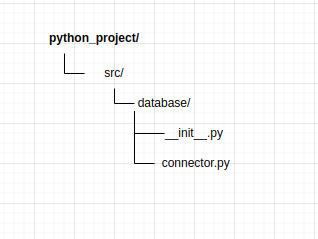
As you can see in our project — python_project — we have a source (src) directory where we would place all our code. We have a package — database — with an empty __init__.py file and a module — connector.py — to connect to our Database somewhere.
Creating Utils Package
Of course, we can add multiple packages as needed to make our code better organized and easy to maintain. Let’s say you have modules used in multiple places in your code. They are kinda of dependencies for your project.
We could create a package that holds all those modules to be imported where they are needed and with that, we avoid having duplicated codes in our projects.
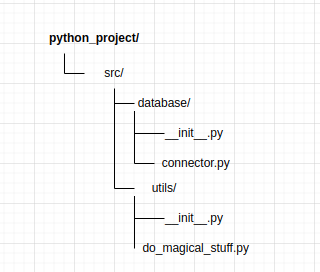
Normally this package is named utils, but that’s nothing written in stones that says that you have to name it like this. It’s just best practice and you decide if you want to follow it or not, but it’s best practice maybe you should.
We could for instance import our module — do_magical_stuff.py — in our connector.py:
# database/connector.py
#
# importing the module do_magical_stuff from utils/

from utils import do_magical_stuff

from sqlalchemy.orm.session import Session
from sqlalchemy.orm import sessionmaker
from sqlalchemy import create_engine


def connect(bd_url: str) -> Session:
    # call our module to handle some magical stuff before connecting
    do_magical_stuff()
    return sessionmaker(bind=create_engine(db_url))
Creating Models Package
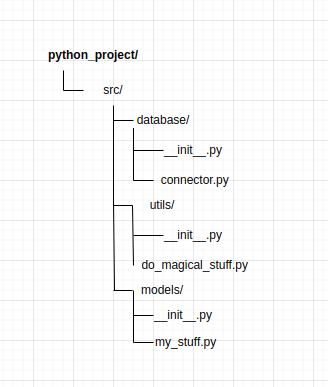
Because we are using a Database in our example, let’s assume that you want to have a representation of the tables — models —, a good approach would be to organize them separately in a single package to make it easier to maintain and more readable.
Creating Routes Folder
One last use-case. If you are building an API, you probably will have a bunch of endpoints. Endpoints can be grouped according to what they do.
Let’s say that our system allows us to manage a product. Managing something usually means that we will have this scenario:
Create a Product
Update a Product
Read a Product
Delete a Product
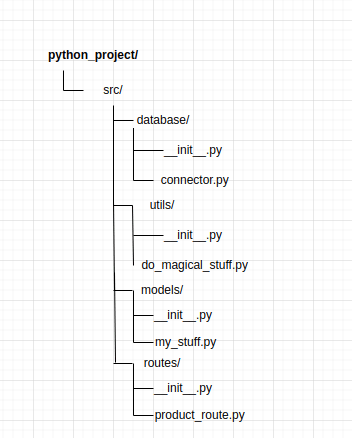
We could group all endpoints related to the product inside one single module — product_route.py —, doing so would make your life much easier instead of putting all endpoints inside one single file, especially if your project grows.
Conclusion
That’s all I had to say. I hope I was able to help you, and if not, maybe next time. See you 🏂.
Can you do me one favor? Small one. If you enjoyed reading this and other articles I wrote, leave a like and comment with your thoughts. If you know someone who might like it as well, consider sharing it with them ✨.