
3 Things From New Python 3.12 You Should Know
What's new in Python 3.12


Python 3.12 was released on October 2nd, 2023.
You might wonder what’s new in this new version and if it’s worth upgrading to the new version.
The short answer, IT DEPENDS.
If you’re using Python 3.11 you probably don’t need to upgrade to the new Python version, especially if your project is already in an advanced stage.
But, upgrading to a new and stable version is always a good idea.
In this article, I will show you five things you should know about the new Python 3.12.
Of course, there is more than this in the new Python, but after taking a careful look, I think these are the ones most of us should worry about:
Explicit override typing
Some of the fundamental concepts of OOP are method overriding and method overloading.
Overriding involves redefining a method inherited from a parent class to customize its behavior.
In Python, overriding a method can be done easily this example from:
class Car:
    def fill_gas(self, gas): ...

class DieselCar(Car):
    # override this method from parent class
    def fill_gas(self, gas):
        print("I only run on diesel")

class PetrolCar(Car):
    # override this method from parent class
    def fill_gas(self, gas):
        print("I only run on petrol")
One of the problems with this approach, as related in PEP 698, is that if we remove or edit the overridden method — fill_gas — from the parent class, there’s no way for the type checker to alert us about that.
So the overridden methods from the child class will be “unrelated” to our parent class.
And that’s not supposed to be true. And it might lead to bugs.
That’s why a new decorator to solve this issue was introduced in Python 3.13 — @typing.override.
from typing import override

class Car:
    def fill_gas(self, gas: str) -> bool: ...

class DieselCar(Car):
    # override this method from parent class
    @override
    def fill_gas(self, gas: str) -> bool:
        print("I only run on diesel")

class PetrolCar(Car):
    # override this method from parent class
    @override
    def fill_gas(self, gas: str) -> bool:
        print("I only run on petrol")
When the type checker sees that our method is being decorated with @override, it will treat it as a type error if we change or remove the method from the parent class.
from typing import override

class Car:
    def fill_gas(self, gas: str) -> bool: ...


class DieselCar(Car):
    # override this method from parent class
    @override
    def fill_gas(self, gas: str) -> str:
        # Type Check Error: return signature does not match the parent class's method
        print("I only run on diesel")
As we can see in this example, by using @override in our child class, we will get a type check error if we change the return type, arguments, or the name of the overridden method.
Better error handling and message
With this new update, we now get a better understanding of the error.
With this new change if, for some reason, we forget to import a standard library, we will have a clear error message suggesting that we might have forgotten to import it.
Take this example from Python 3.10:
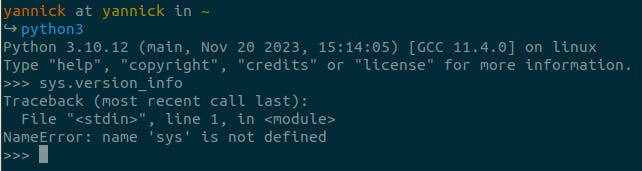
We didn’t import the sys library and the error message we get is that — name ‘sys’ is not defined.
In Python 3.12 we get a more concise error message:
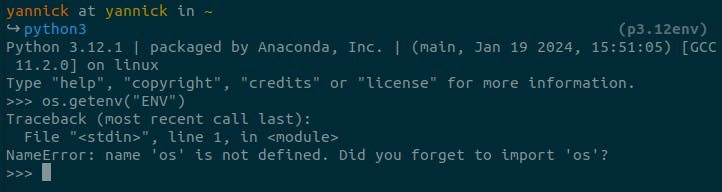
The error message now is clearer and easier to spot and fix the issue — name ‘os’ is not defined. Did you forget to import ‘os’?
Python is now faster — asyncio is now 75% faster
The
asynciopackage has had a number of performance improvements, with some benchmarks showing a 75% speed-up.
For this one, I had to run a couple of tests to see whether the difference in terms of performance is really that big.
However, I didn’t observe a significant difference. Of course, this will depend on what you’re coding, your computer, and other factors.
I used a code from one of my previous articles. The code is responsible for going through a folder and performing Optical Character Recognition on every .pdf file found.
Enhancing Performance In Python Code — Drastically
Python Asyncio: From 21 minutes to 6 minutes
import asyncio
import os
import time
from typing import Any

import pytesseract
import pdf2image


API_URL = "nlpapi.some"
DIR_PATH = './data'

async def read_image(image: Any) -> Any:
    return pytesseract.image_to_string(image, output_type=pytesseract.Output.STRING)


async def process_file(filepath: str) -> Any:
    """
    In order to perform OCR on a PDF file, I first need to convert it to a file.
    To do that I'm using pdf2image function convert_from_bytes, which returns a list
    of images corresponding to each page in the file.
    """
    images = pdf2image.convert_from_path(filepath, dpi=200)
    tasks = [
        read_image(
            image=image,
        ) for image in images
    ]
    result = await asyncio.gather(*tasks) # [4]
    return result


async def read_dirs(dirpath: str) -> list:
    to_do = [process_file(f"{dirpath}/{file}") for file in os.listdir(dirpath)]
    to_do_iter = asyncio.as_completed(to_do) # [5]
    final_result = []
    for future in to_do_iter:
        final_result.append(await future)
    return final_result


if __name__ == '__main__':
    start = time.perf_counter()
    result = asyncio.run(read_dirs(DIR_PATH))
    elapsed = time.perf_counter() - start
    print(f'Took us [{elapsed:.2f}s] to run [{read_dirs.__name__}]')
The difference between running the same code, one in a virtual environment with Python 3.12 installed and the other with Python 3.10 was minimum:

Now let’s see for Python 3.10:

After googling a little bit, I was able to find a more detailed performance analysis between Python 3.12 and Python 3.11, and the same pattern came to light.
In some tests, Python 3.11 had better performance.
Python 3.11 vs Python 3.12 - performance testing
This article describes the performance testing results of Python 3.12 compared to Python 3.11. A total of 91 various…
But, as I said previously, this performance result depends on various factors from the code itself, to where the code is running(computer) to the task itself.
Final thoughts
There are lots of new cool things that I didn’t cover here but you definitely should know.
Before upgrading to a new version, make sure you know what are the benefits of doing so. I’m not going to upgrade yet any of the projects I have in production.
But, every new project I start is going to be with Python 3.12.
Let me know your thoughts on Python 3.12 and if there are any things I should’ve mentioned in this short article.
Are you using it in any of the projects you’re working on? If so, what do you think of it so far?
Hi! Thank you for your time reading my article. If you enjoyed this article and would like to receive similar content directly to your inbox